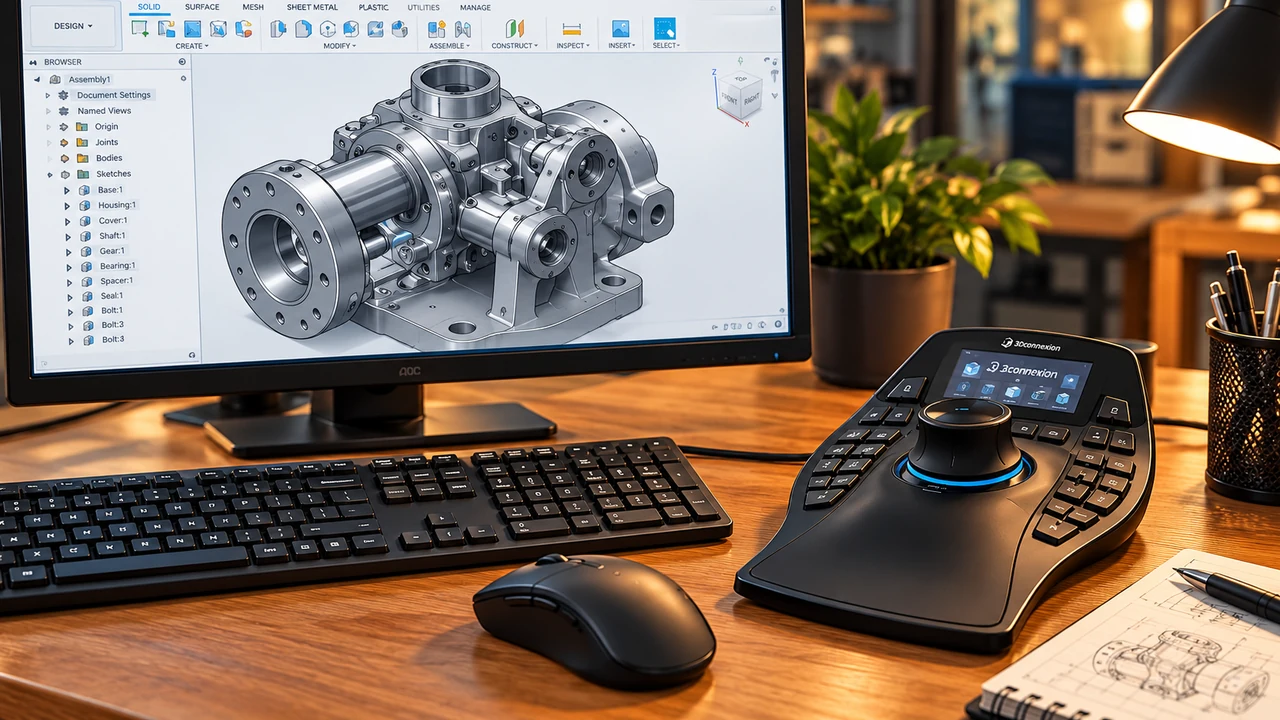
A SpaceMouse is not a replacement for an ordinary mouse. It is a second input device, typically used with the non-dominant hand to pan, zoom and rotate a 3D model while the other hand continues selecting geometry and commands. The question is not whether it can move a model—it can—but whether that extra control is worth the cost for the kind of CAD work you do.
Using Inventor? See our practical guide: Can You Use a SpaceMouse with Autodesk Inventor?
Disclosure: This is a researched comparison, not a hands-on test. I have not owned or personally tested a SpaceMouse. Former CAD students working in industry have spoken positively about these devices, including one who described a learning period before finding the workflow difficult to give up. Those conversations are useful context, not independent performance measurements.
What does a SpaceMouse actually do?
Its pressure-sensitive cap supports six degrees of freedom: move left/right, forward/back, up/down, and rotate about three axes. In supported software this lets you navigate around a part or assembly more continuously than repeated mouse-and-keyboard view commands. You still need your ordinary mouse for pointing, selecting and much of the modelling work.
Five SpaceMouse models compared: wired and wireless
All five offer six-degrees-of-freedom navigation, but they differ in physical controls, connection options and hand support. The Compact remains a useful reference point even though it was unavailable on Amazon UK when this guide was prepared.
| Model | Connection | Controls and ergonomics | Amazon UK buying option |
|---|---|---|---|
| SpaceMouse Compact | USB wired | Small footprint, two programmable buttons | Unavailable at time of writing |
| SpaceMouse Wireless — Bluetooth Edition | Bluetooth / supported USB connection | Compact controller with two programmable buttons | Check Wireless on Amazon UK |
| SpaceMouse Pro (wired) | USB wired | Hand rest, view and modifier keys, programmable shortcuts | Check Pro wired on Amazon UK |
| SpaceMouse Pro Wireless | Wireless; verify exact connectivity and generation on listing | Pro-style hand rest and shortcut controls without a permanently attached cable | Check Pro Wireless on Amazon UK |
| SpaceMouse Enterprise | USB wired | Large hand rest, extensive command keys and colour LCD | Check Enterprise on Amazon UK |
Retailer prices and stock change, so follow the links for current details. Some older SpaceMouse Wireless products use a dedicated receiver rather than Bluetooth: check the product generation, connectivity and package contents before ordering. The Amazon listing's wording is not a substitute for confirming the manufacturer's exact model.
SpaceMouse Compact: the wired baseline
The Compact is the simplest wired option, with a small footprint and two programmable buttons. It demonstrates that the essential SpaceMouse feature is 3D navigation, not an extensive bank of shortcuts. As it was unavailable on Amazon UK during our review, it is included for comparison rather than as a current Amazon purchase recommendation.
SpaceMouse Wireless — Bluetooth Edition: a practical entry-level option
The Wireless Bluetooth Edition offers a similar compact navigation experience while avoiding a permanently attached cable. It is attractive for a tidy desk or moving between compatible workstations. Check the supplied charging and connection accessories and supported operating systems before buying.
Best for: users trying a SpaceMouse for the first time who value wireless convenience.
SpaceMouse Pro wired: shortcut controls without battery concerns
The wired Pro adds a shaped hand rest, view controls, modifier keys and application shortcuts. For a fixed CAD workstation, a cable is not necessarily a disadvantage: there is nothing to charge, and connectivity is straightforward.
Best for: frequent CAD users who prefer a permanent desk setup and additional physical commands.
SpaceMouse Pro Wireless: Pro controls with a tidier desk
Pro Wireless offers the same general proposition as the wired Pro—3D navigation with more command access—but without the permanent cable. This can be useful on a shared desk or when moving between computers. The trade-offs are charging, wireless setup and potentially a higher price. Check the exact generation: a listing titled “Pro Wireless” does not by itself establish that it is the newer Bluetooth Edition.
Best for: regular CAD users who want Pro-style ergonomics and prefer wireless operation.
SpaceMouse Enterprise: the workstation specialist
The Enterprise has a large hand rest, extensive programmable controls and a colour LCD for command assignments. It makes most sense when the user regularly works with complex applications and will invest time configuring shortcuts. Its extra controls do not automatically make 3D navigation itself better.
Best for: established CAD professionals who will actually use the additional commands.
Wired or wireless: which is worth choosing?
A wired SpaceMouse is simple to maintain and suits a fixed workstation. Wireless can make a desk neater and is useful if the controller is moved between setups. Neither is inherently faster at modelling: your CAD package, navigation habits and shortcut configuration matter much more. For the Pro models, compare the current retailer prices and confirm the exact wireless technology before deciding.
Is a SpaceMouse worth the money?
If most of your work involves 2D drawings, a SpaceMouse may add little. If you regularly inspect and manipulate 3D assemblies, it may make navigation more comfortable and intuitive after an adjustment period. That is a potential workflow benefit, not a proven speed improvement for every user. It does not replace a normal mouse.
Learning curve and software compatibility
Expect to spend time learning how gently to move and twist the cap. Begin with pan, zoom and orbit, then tune sensitivity and add shortcuts gradually. Before purchasing, check your precise CAD application, version and operating system against 3Dconnexion's compatibility information and the latest 3DxWare driver.
Which would I choose?
For someone trying 3D navigation for the first time, the SpaceMouse Wireless Bluetooth Edition is now the most practical Amazon UK starting point from this shortlist, given the Compact's reported unavailability. For frequent use at a fixed desk, the wired Pro remains compelling. If cable-free operation matters, compare it with the Pro Wireless. The Enterprise is for people who expect to use its many command keys, not simply for those who want smoother orbiting.
I have not owned or personally tested a SpaceMouse, although I have heard positive feedback from former CAD students working in industry. These are researched buying suggestions rather than hands-on performance claims.
Check current Amazon UK availability
These four links were supplied through CADMarket's Amazon Associates account. Check the model description and latest price before purchasing:
- SpaceMouse Wireless — Bluetooth Edition (Amazon UK)
- SpaceMouse Pro — wired (Amazon UK)
- SpaceMouse Pro Wireless (Amazon UK)
- SpaceMouse Enterprise (Amazon UK)
For official specifications and supported software, consult 3Dconnexion's UK website. As an Amazon Associate I earn from qualifying purchases.